 looma.
Moving an original to the Windows Recycle Bin does not immediately remove every copy. Looma also keeps a temporary local recovery copy for Undo, and its gallery uses local thumbnail and preview caches. Each has a different cleanup lifecycle.
Three locations to understand
| Location | Purpose | What happens next |
|---|---|---|
| Your original photo folder | Holds the file you selected. | Move to Trash removes that original from this folder. |
| Windows Recycle Bin | Receives the original through the operating system’s trash action. | You can restore files that are still there; later removal is controlled by Windows and your actions. |
| Looma’s local data | Holds display previews, thumbnails, and a temporary Undo copy. | Unused image caches are cleaned during scans. Expired Undo copies are cleaned on the next applicable app operation. |
That explains why a folder can have fewer photos while overall disk usage changes very little. If you are evaluating storage, check the drive rather than treating Looma’s image count as a measurement of recovered disk space.
How to remove a photo with a chance to correct a mistake
- Leave Quick delete off, or enable Confirm before moving to Trash in Preferences.
- Open the image and check its name, location, dimensions, and format.
- Select Move to Trash and read the confirmation dialog.
- Confirm the individual file, then check the result before continuing.
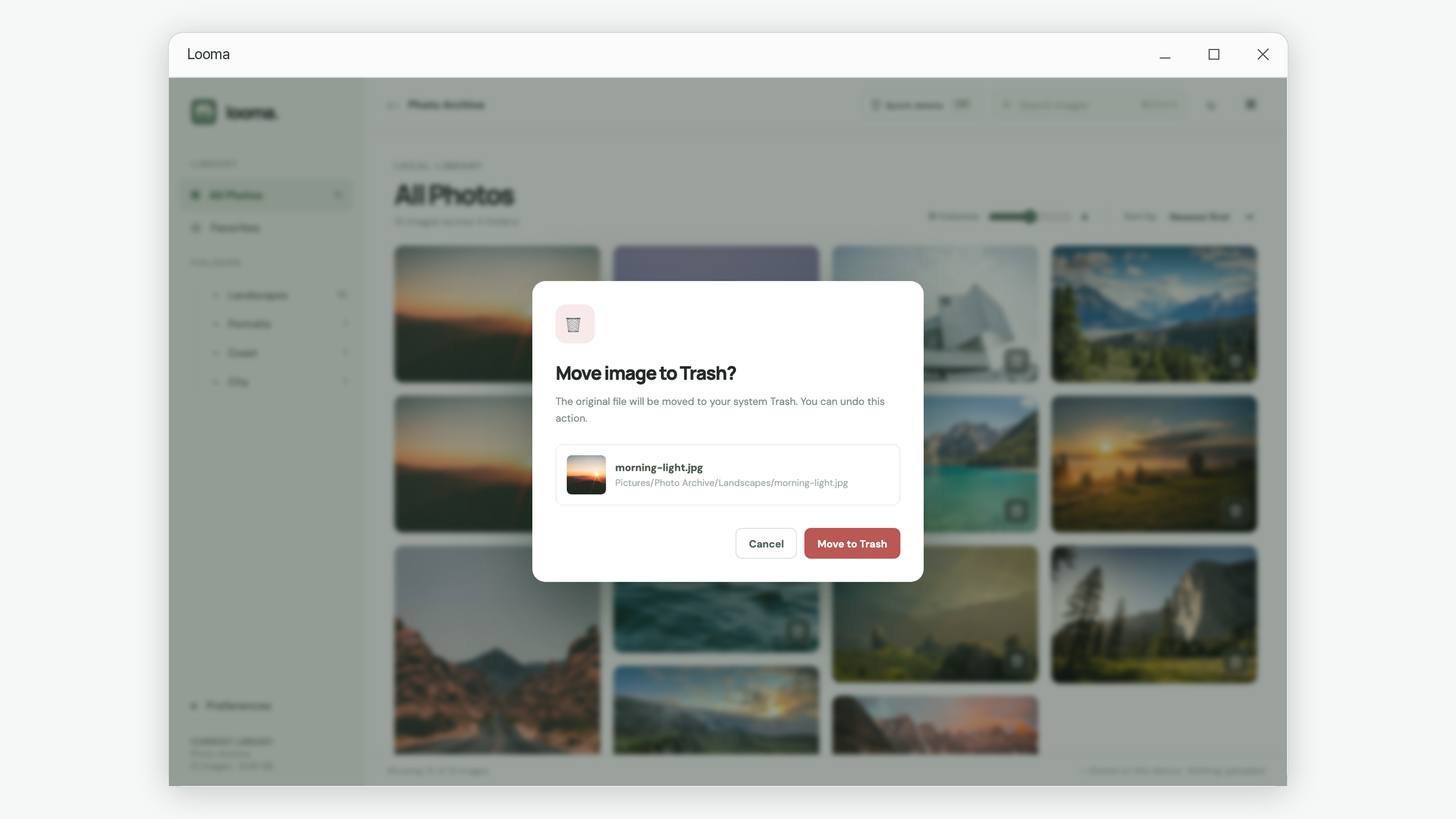
Use Undo while the notification is visible
After moving an image, Looma displays an Undo action in a brief notification. Select it immediately if the move was a mistake. The app restores the file to its original location using its temporary recovery copy.
The notification tracks the most recent deletion. Looma does not provide a history browser with a button for every earlier action. Keeping temporary copies for 24 hours does not mean there is a 24-hour Undo button in the interface.
If you switch to another library, its index stays separate. Restoring a file from the previous library does not mix that file into the current folder’s gallery.
If the notification has disappeared, check the Recycle Bin
Open the Windows Recycle Bin, find the picture, and check its name and original location. If the correct item is still available, right-click it and choose Restore. Microsoft documents this computer recovery workflow in its file restoration guidance .
After restoring a photo outside Looma, return to its original library, select Rescan, and confirm. The gallery uses a saved index, so an external restoration does not appear until you refresh that index. If the original folder now contains another file with the same name, resolve that conflict before attempting restoration.
When does Looma remove its temporary copy?
Undo copies become eligible for cleanup after 24 hours. They are removed when the app next starts, another photo is moved to Trash, or a scan runs. Cleanup is triggered by those operations; it is not a timer that necessarily runs at the exact 24-hour mark.
For example, if you move an image on Monday evening and close the app, its temporary copy may remain after Tuesday evening. Reopening Looma after it has expired triggers cleanup. The system Recycle Bin has its own lifecycle and is separate from this temporary copy.
How to manage storage after a completed review
- Review the Recycle Bin first. Confirm that you have kept the originals you need before choosing a permanent removal there. Once an item is removed from the Recycle Bin, that recovery route is no longer available.
- Allow the temporary recovery period. Expired Looma Undo copies are removed during the operations described above.
- Refresh the current library after external changes. A confirmed Rescan updates the index and cleans unused image previews and thumbnails.
- Choose another library when the task is done. Old photo records and similarity results are cleared. Unexpired Undo records are retained temporarily rather than discarded immediately.
For a cleanup you can assess as you go, follow the photo folder review tutorial . It focuses on choosing keepers before removing copies, which is more useful than rushing toward a lower image count.
Common questions
Does Quick delete permanently erase the file?
It skips Looma’s confirmation dialog. It still uses the same Move to Trash action for the individual original.
Why does the app still store preview images?
Previews and thumbnails make the local gallery practical to browse. They are separate display files; unused ones are cleaned at the start and end of scans.
Is Undo a backup system?
No. It is a short-term way to correct a recent move. Keep important photographs in a separate, durable backup as part of your own storage workflow.
Put the workflow into practice.
Review a local folder, compare the pictures, and decide what deserves to stay.
View Looma in Microsoft Store